Ads 468x60px

Labels

Caution

Disini saya hanya ikut share saja , kurang lebih nya mohon dimaafkan.

Special thanks for :
Mediafire
Indowebster
Ganool.com
Isalgames
Gamocore
B-4fun

dan semua pihak lain yang terlibat dalam content di blog ini..


Visitor

Facebook Pages

Labels

About

Tampilkan postingan dengan label Theme. Tampilkan semua postingan

Sabtu, 28 Januari 2012

Angry Birds Skin Pack 1.0 32bit


Angry Birds Skin Pack 1.0
Angry Birds Skin Pack 1.0 32bit | 30 MB

Jika Anda suka bermain "Angry Birds" dan Anda menggunakan Windows 7, maka Anda pasti akan menikmati paket skin ini.

"Angry Birds Skin Pack" adalah paket transformasi baru untuk Windows 7 diciptakan oleh "hameddanger" @ DA yang mengubah tampilan windows 7 kamu jadi keren dan lucu, Angry Birds ke Desktop Windows Anda.

Perubahan Mencakup:
Angry Birds game theme, icons, login screen, boot screen, wallpapers, mouse cursor, dock, toolbar dan banyak lagi.

Skin ini dapat diinstal di Windows 7 dengan atau tanpa SP1. Tersedia untuk kedua versi 32-bit dan 64-bit Windows 7. Tapi untuk saat ini saya hanya mempunyai versi 32bit.

Instalasi:
1. Setelah download, ekstrak file
2. Jalankan Angry Birds Skin Pack 1.0-x86.exe
3. Reboot PC
4. Selesai

Mediafire Pass : www.soft-games-movies.com

Blue Zune Skin Pack 3.0 for Windows 7 x86 x64


Blue Zune Skin Pack 3.0
Blue Zune Skin Pack 3.0 for Windows 7 x86 x64 | 30 MB

Blue Zune Skin Pack akan mengubah desain di Windows 7, membawanya ke bentuk antarmuka, mirip dengan Zune dari Microsoft. Semua komponen dari paket layanan akan diinstal secara otomatis dan Anda hanya perlu menjalankan installer sesuai bit (x86 atau x64). Setelah instalasi selesai, anda hanya me-restart Windows dan lihat perubahan dalam desain dari "Windows 7".

Sebelum menginstal tema tutup semua program yang berjalan. Untuk hasil cepat dan benar Zune Skin Pack, remove Skin Pack lain (jika mereka telah diinstal sebelumnya) untuk menyesuaikan antarmuka (Skin Pack).

Didukung OS: - X86 (32bit) - Windows 7, Windows 7 SP1 - Untuk x64 (64bit) - Windows 7, Windows 7 SP1.

Dukungan untuk semua Program Lokal, yang aktif di dalam topik ini:
- Resource Hacker oleh angus johnson 3,6
- Moveex 1,0 oleh Alexander Frink
- Theme Patcher Universal 1.5.0.22 oleh deepxw
- Win7BootUpdater v0 1 Beta oleh jeff
- - RocketDock 1.3.5 oleh Punk Labs,
- Skin dengan hameddanger
- Tema Dengan giannisgx89 Refresh oleh hameddanger
- Ikon oleh yankoa Refresh oleh hameddanger
- kursor oleh Necro949445 Refresh oleh hameddanger
- layar boot dengan ghoster76 Refresh oleh hameddanger
- Skin Pack Toolbar oleh bigseekpro
Baru di versi ini: - Ikon-ikon baru - Topik baru - tombol Baru - wallpaper Baru - login Tahun Baru layar: 2011 Off. website: www.deviantart.com:
Bit 32bit + 64bit OS: Windows 7 Bahasa: ML

Password : www.soft-games-movies.com

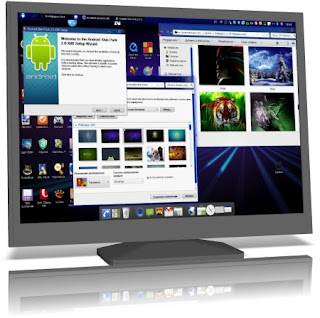
Android Skin Pack 2.0 for Windows 7 (x86/x64)


Android Skin Pack 2.0
Android Skin Pack 2.0 for Windows 7 (x86/x64) | 54 MB

Android Skin Pack akan memungkinkan pemilik untuk mengkonversi antarmuka Windows 7 dari sistem mereka ke Android analog (Android - sistem operasi untuk smartphone, tablet PC, pemain digital, bingkai foto digital, jam tangan, netbook dan smartbook berbasis kernel Linux. awalnya dikembangkan oleh Android Inc, yang kemudian dibeli Google). Semua komponen yang membentuk tema, sepenuhnya otomatis dan tinggal install (x86 atau x64 - masing-masing bit dari sistem anda). Setelah instalasi selesai, restart Windows dan lihat perubahan yang terjadi.

NB: Sebelum menginstal tema, tutup semua program yang berjalan. Setelah instalasi, Anda harus me-restart sistem. Untuk instalasi yang cepat dan benar Android Skin Pack 1.0 harus dihapus (jika mereka telah diinstal sebelumnya) atau versi lain paket untuk menyesuaikan antarmuka (Skin Pack).

Supported OS:
- X86 (32Bit) - Windows 7, Windows 7 SP1
- For x64 (64Bit) - Windows 7, Windows 7 SP1
- Support for all locales

Programs that are included in this topic:
- Resource Hacker 3.6
- Moveex 1.0 by Alexander Frink
- Universal Theme Patcher 1.5.0.22 by deepxw
- Win7BootUpdater v0 Beta 1 by jeff
- RocketDock 1.3.5 by PunkLabs skin by me
- UberIcon 1.0.4 by PunkLabs
- Y'z Shadow 2.3 beta3 by M. Yamaguchi
- Theme By oldblueeyes182 Refresh by Me
- Icon by brsev Refresh by Me
- Cursor by jacksmafia
- Startorb by shiroi33 refresh by me
- Bootscreen by ghoster76 refresh by me
- Skin Pack Toolbar by bigseekpro

New in this version:
- New theme
- New icons
- Updated bootscreen
- New wallpaper

Jika belum mempunyai Android Skin Pack 1.0 Silahkan download Android Skin Pack 1.0 for Windows 7 (x86 x64)

Mediafire Pass : www.soft-games-movies.com

Kamis, 26 Januari 2012

Windows 8 Skin Pack 6.0 for Windows 7 Full + Logon Screen Changer


Kumpulan Software Gratis | Windows 8 Skin Pack 6.0 for Windows 7 Full + Logon Screen Changer | Although Windows 8 already in the release version of the campaign, but I am more interested in trying out Skin Pack only. Why? Since they have not had time to download and lazy to try it. But later I will try to review. Well, while waiting for Windows 7 users who want to change your looks to be like Windows 8, Windows 8 Skin Pack maybe this can help a bit although no changes are so striking. The changes are striking in appearance Boot and Logon Screen. Please for those who want to try.
 
8 Skin Pack is a transformation That package is designed to help you bring the looks of Windows 8 onto your Windows 7 computer. The installation is very simple and enables you to choose the elements you want to change.

 
8 Skin Pack also includes some extras to Further Enhance the looks of your PC.

Note: The application provides two installation modes. The Quick one Will change the user-defined home page, the browser search engines and Will install a browser toolbar. If you do not want any changes to be applied to your system, you are advised to select the Custom installation.

 
8 Skin Pack contains a set of components for rapid updating of the Windows 7 interface to give it a design similar to the Windows system 8. The package will from Itself completely automatically install after starting Appropriate to your system (x32 or x64) installer. After the computer restarts you see a completely different will from Windows!

Attention! During the launch of the installation must be a connection to the Internet.
For some programs in the system must be installed. Net Framework.
Before starting the installation package, you must turn off User Account Control and close all running programs. After installation, you must restart the system.
For quick and correct installation of 8 Skin Pack must be removed (if installed Previously They were the resource persons) or other other versions of packages to customize the interface (Skin Packs).

 
Supported operating systems:
- X86 (32Bit) - Windows 7, Windows 7 SP1
- For x64 (64bit) - Windows 7, Windows 7 SP1, Windows Server 2008 R2, Windows Server 2008 R2 SP1
- Support for all locales

 
The program used in:
- Resource Hacker
- Moveex 1.0 by Alexander Frink
- Universal Theme Patcher 1.5.0.22 by deepxw
- Win7BootUpdater Beta v0 1 by jeff
- Newgen Stable Version 3.0
- Taskbar 7.1 alpha UserTile By angelwzr
- Aura Beta 3 By Stealth2010
- Lock MetroClock ScreenSaver by dejco
- Metro Black & Glass Theme By jaycee13
- Metro White Theme By pisadeviant
- Basic Lite Aero Theme By thepanda_x
- Lite Aero Glass Theme By shelkadom
- Full Lite Aero Glass Theme By velix94 Refresh by Me
- Boot by lysy1993lbn
- Skin Pack Toolbar by bigseekpro

 
New in version 6:
- New topics
- New button to start
- New styles of shell
- New icons
- New wallpaper
- New Fonts
- The new cursor
- New starscreen
- New StartMenu
- New frames
- New buttons
- New logo
- A new brand
- New login
- New boot
- New Installer

 
When I first installed, I do not like the Logon background Screen and the Start Button 8 Skin Pack, now for those of you who do not like and want to change the logon background screen and the Start Buttonnya, you can use the software Logon Screen & Start Button Changer Windows 7 below:
 
Password : www.dytoshare.us